
Klap Review (2026): Clip-Based Pricing, No Free Recurring Tier
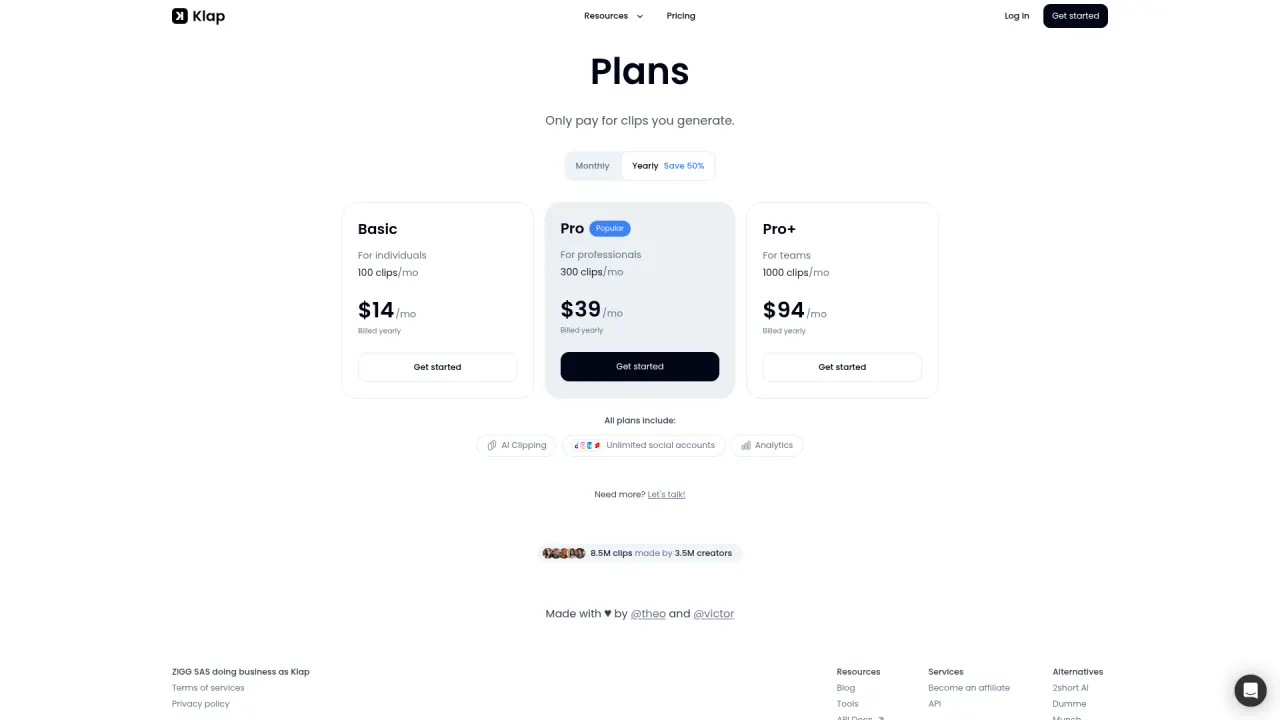
Klap turns long-form video into TikToks, Reels, and Shorts with AI clip selection, auto-reframe, and captions in 52 languages — used by teams at Red Bull, Spotify, and the BBC per its own case studies. Verified July 2026 pricing (annual view, its default toggle): Basic $14/mo (100 clips), Pro $39/mo (300 clips, 4K, AI dubbing), Pro+ $94/mo (1,000 clips) — all roughly 50% higher on monthly billing ($29/$79/$189, per Klap's own comparison blog). There is no recurring free plan, only one free trial video. Like every clipper, it repurposes footage you already have and cannot generate ad creative from a product.
What is Klap?
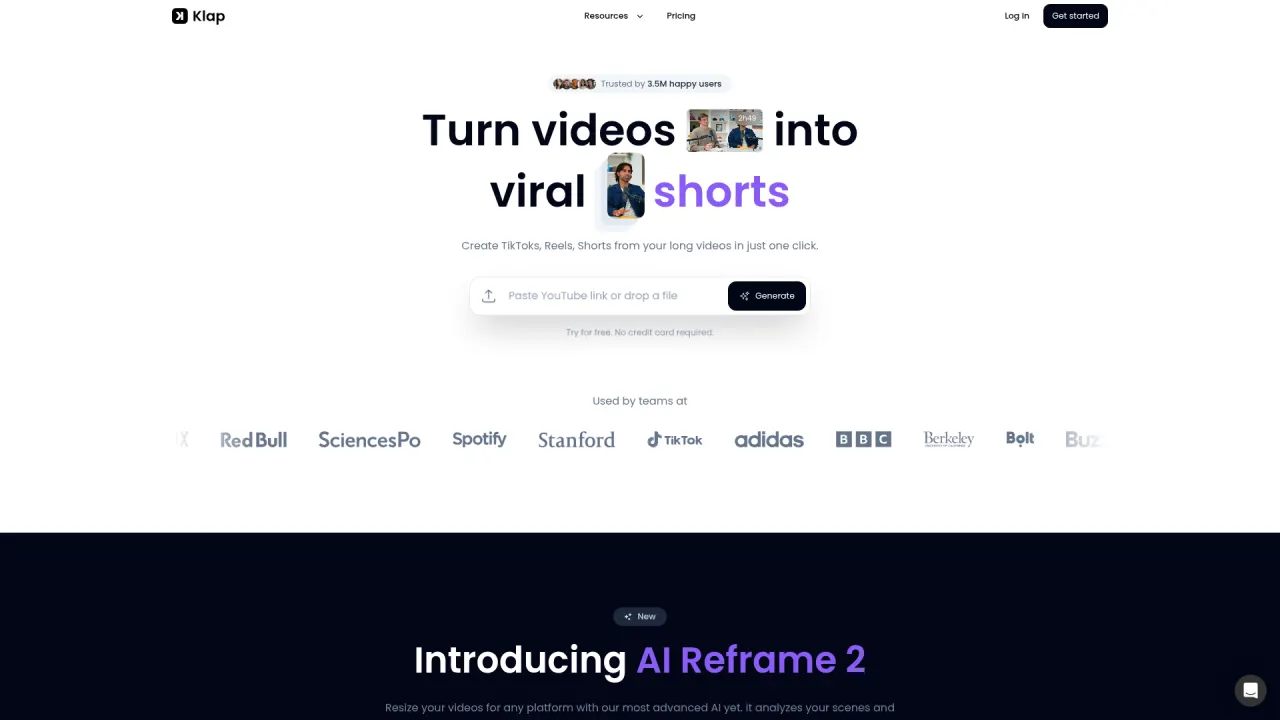
Klap does the same core job as OpusClip and Vizard: paste a YouTube link or upload a video, and its AI finds the strongest moments, cuts them into vertical clips, reframes for 9:16 with face-tracking, and burns in animated captions with a virality-style score. Its rule of thumb, stated on its own homepage, is that one minute of source video yields about 5 output clips. The newest feature, AI Reframe 2, extends auto-layout beyond simple face tracking to scene-aware formats — split screen, screencast, and gaming layouts — chosen automatically per scene.
Where Klap differs structurally from OpusClip and Vizard is the billing unit. Instead of processing-minute credits, Klap sells a monthly clip count plus a maximum source-video length: Basic allows 100 clips/mo from uploads up to 45 minutes; Pro allows 300 clips/mo from uploads up to 2 hours, adds 4K downloads and AI dubbing in 29 languages; Pro+ allows 1,000 clips/mo from uploads up to 3 hours. Transcription and captioning support 52 languages across every tier.
Onboarding is thin by design: there is no recurring free plan, only a single free video with no credit card required, after which the cheapest way in is Basic. Klap's own case studies cite enterprise-scale users (Red Bull, Spotify, Stanford, BBC, TikTok, adidas), which reads as agency/media-team positioning more than solo-creator positioning — reinforced by Pro's price sitting well above OpusClip's or Vizard's equivalent tier.
The category boundary is identical to every other clipper in this review set: Klap has no avatars, no script generation, and no product-URL ingestion. If there's no long-form source video, there is nothing for Klap to process — that gap is a different tool's job.
Official site: klap.app
Klap up close
Klap key features
AI clip selection with a fixed clip-count budget
Klap's engine extracts the strongest segments from uploaded long-form video and estimates roughly 5 clips per source minute. Unlike OpusClip's virality score, output is capped by a hard monthly clip count (100/300/1,000) rather than by processing minutes, which makes planning simpler but caps total output even on short source videos.
AI Reframe 2 (scene-aware auto-layout)
The newest feature analyzes each scene and picks a layout automatically — split screen, screencast, gaming, or standard face-tracked framing — rather than applying one reframe style to the whole video. This is Klap's clearest technical differentiator versus simpler face-tracking-only reframers.
4K downloads and AI dubbing (Pro and up)
Pro and Pro+ unlock 4K export and AI dubbing across 29 languages — a genuine edge over OpusClip and Vizard, neither of which publishes multilingual dubbing at a comparable price point. Basic is capped at HD.
Source-length ceilings by tier
Basic accepts uploads up to 45 minutes, Pro up to 2 hours, Pro+ up to 3 hours. This is a hard gate, not a soft credit tradeoff — a 90-minute podcast simply cannot be processed on Basic regardless of clip count remaining.
Captioning and transcription in 52 languages
Broader language coverage than most rivals in this review set, available on every paid tier. Speech-detection-led clipping means, as with every competitor here, non-verbal or visually-driven content (sports, gameplay without commentary) is weaker ground.
Publish and schedule to TikTok, YouTube, Instagram, LinkedIn
Direct publishing and scheduling from inside Klap, with unlimited social accounts on every paid plan per its pricing page — a more generous account allowance than OpusClip's seat-gated connections.
Klap pricing
| Plan | Price | What you get |
|---|---|---|
| Basic | $14/mo billed yearly ($29/mo billed monthly) | 100 clips/mo, source video up to 45 min, HD download, AI clipping, unlimited social accounts, analytics |
| Pro | $39/mo billed yearly ($79/mo billed monthly) | 300 clips/mo, source video up to 2 hours, 4K download, AI dubbing in 29 languages |
| Pro+ | $94/mo billed yearly ($189/mo billed monthly) | 1,000 clips/mo, source video up to 3 hours, 4K download, AI dubbing in 29 languages |
Prices verified July 2026 directly on klap.app/pricing, which defaults to the annual-billing view ("Yearly — Save 50%"): Basic $14/mo, Pro $39/mo, Pro+ $94/mo, all billed yearly. Monthly-billing rates — confirmed via Klap's own comparison blog post and third-party review sendshort.ai — are roughly double: $29/$79/$189. There is no recurring free plan; new users get one free video with no credit card required.
Pros and cons
What Klap does well
- 4K downloads and 29-language AI dubbing on Pro — a real edge over OpusClip and Vizard at a comparable tier
- AI Reframe 2's scene-aware layout selection (split screen, screencast, gaming) is more sophisticated than plain face-tracking
- Clip-count-based pricing is simple to reason about: a fixed monthly output number rather than a credit-per-minute calculation
- Unlimited social account connections on every paid tier, versus OpusClip's seat-gated limits
- 52-language caption/transcription support is broader than most named competitors
- Enterprise-grade case studies (Red Bull, Spotify, BBC, Stanford) suggest the pipeline holds up at real production volume
Where it falls short
- No recurring free tier — only a single free trial video, versus OpusClip's 60 min/mo and Vizard's 60 min/mo ongoing free allowances
- Pro at $39/mo billed yearly ($79/mo monthly) is meaningfully pricier than OpusClip's $29/mo or Vizard's $29/mo equivalent tier
- Source-length hard caps (45 min / 2 hr / 3 hr by tier) block processing long recordings outright, rather than just costing more credits
- Repurposing only — no avatars, no script generation, no product-URL ingestion; cannot create ad creative from scratch
- Headline pricing page defaults to the discounted annual view, so the real monthly-billing cost requires a second lookup
Klap vs Prizmad
Klap and Prizmad are not competitors on the same job. Klap turns footage you already have — a podcast, webinar, or long-form upload — into a batch of vertical shorts; Prizmad starts with a product URL and generates the footage itself, producing a finished UGC-style ad end to end (script, one of 50+ AI avatars, AI voiceover, captions, music) in about 5 minutes, backed by an AI Studio with 30+ additional tools. One is a repurposing multiplier; the other is a creative-origination pipeline, and no amount of clip-count budget changes that.
For a DTC team the decision is about what raw material exists. If you're sitting on webinars, founder interviews, or a long-form back catalog, Klap's 4K/multilingual Pro tier ($39/mo billed yearly) is a legitimate, if pricier-than-average, way to mine it. If your actual gap is that there's no source footage to clip — just a product page and a paid-social calendar — Klap has nothing to process, and that's where Prizmad's token plans (Launch $39/mo for 3,000 tokens, Starter $99/mo for ~8 avatar videos, Pro $249/mo for ~35 videos, full commercial rights) do the origination work instead.
| Klap | Prizmad | |
|---|---|---|
| Core job | Long video in → clip-count-capped vertical shorts out | Product URL in → finished UGC-style ad out |
| Entry paid price | $14/mo billed yearly Basic (100 clips, 45-min source cap) | $39/mo Launch (3,000 tokens) |
| Free tier | One free trial video, no recurring free plan | Free signup, no credit card |
| Needs existing footage | Yes — nothing to clip without source video | No — generates script, avatar, voiceover, and product creatives from a URL |
| Time to first finished ad | N/A — output is clips of your content, not ads | ~5 minutes |
| AI avatars / voiceover | None (AI dubbing of existing audio only, Pro and up) | 50+ avatars, AI voiceover, lip-sync |
| Multilingual output | AI dubbing in 29 languages (Pro/Pro+), captions in 52 | Voiceover and captions per avatar/language selection |
| Best-fit user | Podcasters, media teams, agencies with long-form libraries needing 4K/multilingual output | DTC founders and media buyers originating ad creative |
Who should use Klap?
Choose Klap if
- Media teams and agencies needing 4K exports and multilingual AI dubbing on repurposed long-form video
- Podcasters and interview shows with 60-180 minute episodes wanting scene-aware auto-reframe
- Teams that prefer a fixed monthly clip-count budget over calculating processing-minute credits
- International channels needing captions or dubbing across dozens of languages
- Users already comparing OpusClip and Vizard who want a third data point on the same source video
Look elsewhere if
- Budget-conscious solo creators — there's no ongoing free tier, and Pro costs more than OpusClip's or Vizard's equivalent
- DTC marketers needing net-new ad creative — Klap cannot generate footage, avatars, or scripts
- Anyone uploading recordings longer than their tier's cap (45 min / 2 hr / 3 hr) — the ceiling is hard, not a credit tradeoff
- Teams with no long-form video library: there is nothing for the engine to process
- Buyers who want to evaluate risk-free over multiple months — one free video does not support extended testing
Top Klap alternatives
Want the full ranked list with pricing? Klap alternatives — 5 tools compared.
OpusClip
Category leader with a genuine 60 min/mo free tier and transparent $15-29/mo pricing — cheaper than Klap's equivalent tiers.
Vizard
Similar credit-per-minute model with a generous 60 min/mo free tier and a strong in-browser editor.
2short.ai
Budget YouTube-first clipper at $9.90/mo — undercuts Klap's Basic tier significantly.
Prizmad
Not a clipper: generates finished UGC-style ads from a product URL in ~5 minutes — covers the creation job Klap doesn't touch.
Klap review verdict
Klap is a competent, enterprise-leaning clipper with two genuine differentiators — 4K exports with 29-language AI dubbing, and scene-aware AI Reframe 2 — that neither OpusClip nor Vizard matches at the same tier. Rated 3.7: the case studies and feature set are real, but the pricing is the least generous of the three clippers we've reviewed head-to-head, with no recurring free tier and a Pro price ($39/mo billed yearly, $79/mo monthly) meaningfully above OpusClip's or Vizard's equivalent.
The honest recommendation: if multilingual dubbing or 4K is a hard requirement, Klap earns the premium. If it isn't, OpusClip's $15-29/mo range or Vizard's comparable tiers deliver a very similar clipping pipeline for less, with an actual ongoing free tier to test on your own footage first.
And the category boundary applies here exactly as it does everywhere else in this review set: Klap multiplies video you already have. If your actual problem is that you don't have long-form footage to clip — your raw material is a product page, not a podcast — no clipper solves that. That's a generation pipeline's job, and Prizmad (product URL to finished UGC-style ad in ~5 minutes, from $39/mo) is built for exactly that gap.
Rating: 3.7/5 · Last reviewed 2026-07-30 · Prices and limits change often in this space — if you spot something outdated, tell us.
Klap — frequently asked questions
Is Klap worth it in 2026?
It depends on what you need beyond basic clipping. Klap's 4K exports and 29-language AI dubbing (Pro and up) are genuine advantages if you need them, but its pricing — no recurring free tier, Pro at $39/mo billed yearly ($79/mo monthly) — is less generous than OpusClip's or Vizard's comparable tiers, both of which include ongoing free allowances.
How much does Klap cost?
Verified July 2026 on klap.app/pricing (which defaults to the annual view): Basic $14/mo billed yearly (100 clips/mo, 45-min source cap), Pro $39/mo billed yearly (300 clips/mo, 2-hr cap, 4K, 29-language dubbing), Pro+ $94/mo billed yearly (1,000 clips/mo, 3-hr cap). Monthly billing, per Klap's own blog and third-party reviews, runs roughly double: $29/$79/$189.
Does Klap have a free plan?
No recurring free tier — Klap gives new users one free video with no credit card required, then requires a paid plan starting at Basic ($14/mo billed yearly). That's a thinner on-ramp than OpusClip's 60 processing minutes/month or Vizard's 60 upload minutes/month, both of which are ongoing.
Klap vs OpusClip — which is better?
OpusClip is cheaper at every comparable tier and has a genuine ongoing free plan (60 min/mo); Klap counters with 4K exports, 29-language AI dubbing, and scene-aware AI Reframe 2, none of which OpusClip offers at the same price point. If multilingual output or 4K matters, Klap's premium is justified; otherwise OpusClip's $15-29/mo range and free tier make it the easier trial.
How does Klap's clip-count pricing work?
Instead of metering by processing minutes like OpusClip or Vizard, Klap caps output at a fixed number of clips per month (100 on Basic, 300 on Pro, 1,000 on Pro+) and separately caps the maximum length of any single source video (45 min / 2 hr / 3 hr). Both limits apply simultaneously — a 90-minute upload is blocked on Basic regardless of remaining clip allowance.
Can Klap make ads for my product?
No. Klap has no avatars, script generation, or product-URL ingestion — it exclusively clips and reformats existing long-form video. To generate ad creative from scratch, you need a generation tool: Prizmad turns a product URL into a finished UGC-style ad with avatar, voiceover, captions, and music in about 5 minutes.
Does Klap support multiple languages?
Yes — captioning and transcription cover 52 languages on every paid tier, and Pro/Pro+ add AI dubbing in 29 languages for translating the actual audio of a clip, not just the on-screen captions. This is broader multilingual coverage than OpusClip or Vizard publish at comparable prices.