
How to Make a TikTok Ad in 5 Minutes Without Filming (2026 Guide)
Step-by-step guide to producing a TikTok ad from a product URL — no camera, no actors, no editing software. Verified May 2026.
On this page
Most "how to make a TikTok ad" guides written before 2026 assume you'll film yourself, hire a UGC creator, or pay an agency $500–$2,000 per video. In 2026 you don't have to. A product URL, five minutes, and an AI video pipeline produce a TikTok-ready ad with a talking-head avatar, voiceover, subtitles, music, and product footage — already cut to 9:16 1080p.
This guide walks through the exact workflow. No camera, no actors, no editing software. The screenshots below use Prizmad, but the same logic applies to any modern URL→ad tool — compare alternatives at the end.
Why this works in 2026
Three things broke the old playbook:
- URL parsers now extract product title, price, images, and specs from Amazon, Shopify, Etsy, Walmart, and most custom storefronts — automatically. No more copy-pasting product copy into a script doc.
- AI talking-head avatars with lip-sync cleared the uncanny-valley line in early 2026. A static photo plus an audio file produces an avatar that mouths the words at frame-perfect sync.
- Bundled pipelines combined the previously-separate steps — scripting, voiceover, avatar render, product B-roll, captions, music, final cut — into one workflow that runs end-to-end in roughly five minutes.

The cost economics flipped too. A finished ad now sits at $3–14 of compute spend depending on plan, vs $500–$2,000 with a human creator. That's why this is the year the "without filming" workflow became default for performance teams.
The 5-minute workflow
1. Pick the product URL
Open the product page on your store. Copy the URL.
For best parser coverage, the URL should be the exact product page, not a search result or category list. Examples that work cleanly:
https://www.amazon.com/dp/B0CXXXXXXXhttps://your-store.myshopify.com/products/product-handlehttps://www.etsy.com/listing/1234567890/...
If you sell on a custom CMS (Webflow, WooCommerce, BigCommerce, or a hand-rolled storefront), generic page parsing still works as long as the page has a clear product title, price, and at least one image.
2. Paste it into the ad generator
Open Prizmad's create page, paste the URL, hit Start. The parser pulls:
- Product title
- Price (used optionally in the ad)
- Product images (used for the B-roll creative shots)
- Description and bullet specs (used to ground the script)
You'll see a preview of the parsed product. Edit fields if anything looks off — usually the title is over-eager and worth shortening for ad copy. Keep the description trimmed to the actual value proposition.
3. Pick a template and avatar
Templates control the ad's pacing and structure. The common formats:
- Hook → benefit → proof → CTA — the canonical UGC structure. Best default for cold traffic on TikTok.
- Problem → solution — works for products that solve a clear pain (cleaning, organizing, sleep, productivity).
- Quick review — first-person testimonial style, slightly more believable for skeptical audiences.
- Unboxing — works when the physical product reveal is dramatic enough to carry the first 2 seconds.
For most e-commerce stores, default to the hook-benefit-proof template the first time. You can re-render in a different format in seconds once you see the result.
Avatar selection matters for performance. A few rules from running paid ads:
- Match the avatar's age and look to your target customer, not your founder demographics. A skincare ad for 25-year-old women shouldn't use a 50-year-old male avatar even if it tested fine internally.
- Indoor casual setting usually outperforms outdoor or office. TikTok rewards content that looks like organic creator content, not stock corporate.
- Avoid the obvious AI-fake "smile constantly into camera" presets. Pick a more neutral baseline expression — the lip-sync handles the rest.
4. Let the pipeline run
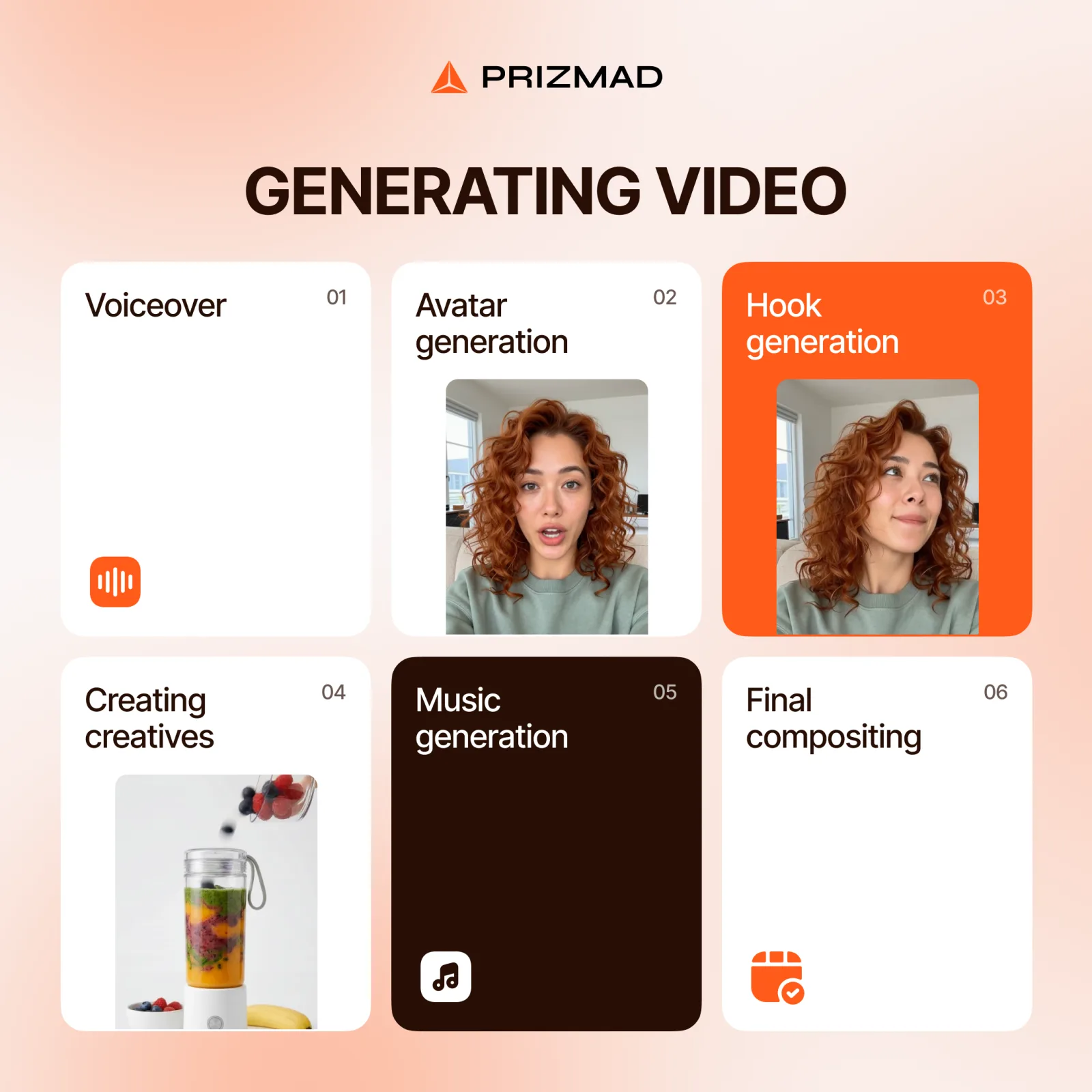
This is the only step where you wait. The pipeline runs the full chain server-side:
- Script generation grounded in the parsed product data
- Voiceover synthesis with native lip-sync language matching
- Talking-head avatar render at frame-perfect sync to the audio
- Product creative shots from your parsed images
- Subtitle generation from voiceover word-timings
- Background music selection and ducking
- Final 9:16 1080p cut for TikTok
Most pipelines run in 3–6 minutes. You'll get a notification or the project status will flip to ready. The result is an mp4 you download or upload directly to TikTok Ads Manager.
5. Upload to TikTok Ads
In TikTok Ads Manager, create a new campaign, hit "Upload Video", select the mp4. TikTok runs its own integrity check — vertical 9:16 1080p ads pass without compression. Check TikTok's safe-zone overlay: the top ~14% of the frame holds the username and caption, the bottom ~35% holds the action stack on iOS and the CTA bar. If your subtitles or product text bleed into either, re-render the ad in the same template with subtitle position adjusted.
That's it. The first ad is live in under 10 minutes from "I should test this product" to "the ad is running."
What to test next
The first ad almost never performs best. Iteration speed is the whole point — making it cheap to test 5–10 variations and keep the winner.
Three changes worth testing on round 2:
- Different opening hook. The first 2 seconds determine if anyone watches the next 8. Regenerate the script with a different hook angle: "Most people don't know..." vs "I bought this so you don't have to..." vs "This $30 thing replaced my $200..." Same product, different first line.
- Different avatar. Same script, different face. If the first avatar tested with a 4% CTR and the second tests at 6%, that's a free win.
- Different music. Slow-tempo lo-fi vs upbeat percussive vs no music. Music alone can shift retention by 15–20%.
Each variation costs the same compute as the first ad. Test 5, keep 1.
Where to start
If you have a product URL, you can test the entire workflow free. No camera, no actors, no upfront cost. The first ad takes about 5 minutes from URL to a downloadable mp4 you can upload to TikTok Ads Manager today.
For a deeper comparison of how Prizmad stacks up against other AI UGC tools — Arcads, MakeUGC, Creatify, HeyGen — see the AI UGC platforms hub for a side-by-side breakdown.