
New in AI Studio: Wan 3.0 for Reference-Led Ads
Wan 3.0 is live in Prizmad's AI Studio: text, image and reference modes, shots up to 30 seconds, native audio, priced by the second.
On this page
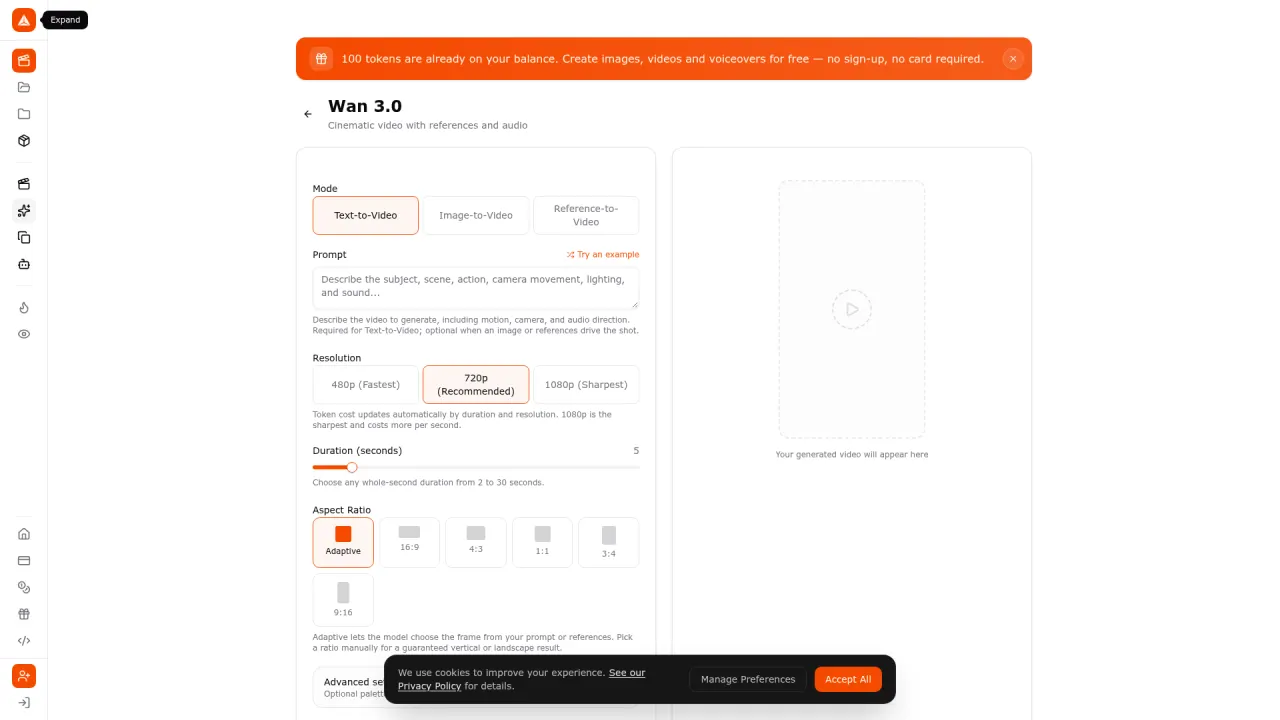
Wan 3.0 is now live in Prizmad's AI Studio. It is a cinematic video model with three ways in — text-to-video, image-to-video, and reference-to-video — that renders shots of up to 30 seconds in a single pass with generated dialogue, ambience and sound effects, and it is billed by the second rather than by the generation.
That last detail is the reason it is worth a post. Most video models in an ad workflow are priced per clip, which quietly punishes the formats that ads actually use: a 6-second hook, a 15-second TikTok cut, a 30-second product spot. Wan 3.0 prices the same way a media plan does — seconds and resolution — so a test clip and a hero shot are different line items instead of the same one.
What shipped
Wan 3.0 lands in AI Studio with the controls an ad team needs and not much more:
- Three modes. Text-to-video, image-to-video (a start frame plus an optional end frame for a controlled first-to-last transition), and reference-to-video.
- Durations from 2 to 30 seconds, chosen as any whole second, default 5.
- Three resolutions — 480p for fast drafts, 720p as the recommended default, 1080p for the final render.
- Six aspect ratios: adaptive, 16:9, 4:3, 1:1, 3:4 and 9:16, with adaptive letting the model pick the frame from the prompt or references.
- Generated audio on by default, so a shot arrives with sound rather than as a silent plate to be scored later.
- Optional seed for repeatable results, plus thinking mode and prompt expansion toggles for prompts that describe a sequence of events.
The reference lane is the one ad teams will use
Text-to-video is the demo. References are the production tool. In reference-to-video you can attach up to 10 reference images, up to 5 video clips and up to 5 audio files in one generation, and refer to them by number inside the prompt — Image 1, Video 1, and so on. Combined reference video is capped at 15 seconds and combined reference audio at 15 seconds.
For ecommerce work that maps cleanly onto the three things that actually need to stay consistent across a campaign: the product, the person, and the motion you already know converts. A catalogue shot defines the pack, a short phone clip sets the camera move that worked, an audio bed sets the pace — and the model composes a new shot around them instead of starting from a sentence and hoping.
This is the difference between generating clips and building a creative system. A brand that has 40 SKUs and one winning motion template does not need 40 new generations to find that motion again; it needs to hand the model the template and change the product.
What a shot costs in tokens
Wan 3.0 is metered by output duration and resolution, so the token cost updates the moment you move the sliders. At Prizmad's published plans — $39 for 3,000 tokens, $99 for 8,000, or $249 for 35,000 — the arithmetic looks like this:
| Output | Tokens | ≈ Cost on Launch | ≈ Cost on Pro |
|---|---|---|---|
| 5s at 480p | 50 | $0.65 | $0.36 |
| 5s at 720p | 100 | $1.30 | $0.71 |
| 5s at 1080p | 200 | $2.60 | $1.42 |
| 30s at 720p | 600 | $7.80 | $4.27 |
Put next to the number that matters: a finished AI UGC ad — script, actor or reference-led shots, voice, captions, assembled — runs about 1,000 tokens, which is roughly $12 per finished ad on Starter. A 30-second Wan 3.0 shot at 720p is 600 of those tokens, so the honest read is that long single-pass shots belong on hero moments, not on every variant. Use 480p and 5 seconds to find the angle, then re-render the winner at 720p or 1080p.
Where it fits in a product-URL pipeline
Prizmad's core workflow still starts where the product does: paste a product URL and get a finished UGC-style video ad, with the script, the avatar or reference footage, the voice and the captions handled as one pipeline. Wan 3.0 adds a second lane beside that one — the shot you would otherwise storyboard, shoot or buy stock for.
Practically, that means fewer reasons to leave the tool. A launch film, a packshot rotation, a lifestyle scene with the product in a real hand, a vertical 9:16 cut of any of them: all of it is now a prompt and a slider inside the same subscription instead of a separate vendor, a separate invoice and a separate file handoff to the editor.
The honest limits
Wan 3.0 is a generation tool, not an ad. A 30-second render is 30 seconds of footage; it is not a 30-second ad, which is a hook, an offer, pacing and a claim, and those still come from the brief. Three specific cautions:
- 1080p costs four times what 480p costs for the same duration. Decide the resolution at the end of the creative process, not the beginning.
- Generated audio is not a finished mix. Dialogue, ambience and effects arrive in the same pass as the picture, which saves time, but it still has to be checked for pronunciation, brand names and level before anything ships.
- On-screen text and typography are still your job. Product labels, legal lines and price flashes should be added in the edit rather than trusted to the render — and the usual AI disclosure rules apply to anything you publish.
As always, we would rather you test a claim than trust a demo: generate the same 5-second shot at 480p and 720p, put both in a real campaign pairing, and let delivery data decide which one earned its tokens.
A short operating checklist
- Licence your references. Reference images, clips and audio need to be yours or cleared — the output inherits what you fed it.
- One claim per variant. Reference-led generation makes it tempting to change three things at once; change one.
- Name by hook, not by date.
serum-ugc-hookA-9x16beatswan-final-v3when you are looking at results three weeks later. - Fix the ratio before the render. 9:16 at generation time is cheaper than a reframe later, and safe zones stay intact.
- Keep the brief, not just the file. The seed, prompt and references are what let you re-render on another model when a better one shows up.
Related reading: what a finished AI video ad actually costs, the disclosure rules for AI-generated advertising, and how to pick an AI UGC tool without locking yourself into one model menu.