
Performance Max Video Ads for Ecommerce: The 2026 Playbook
Performance Max and Demand Gen video ads in 2026: verified specs, per-niche hook patterns, asset-group strategy, and the cost of AI vs human creative.
On this page
Performance Max is the default campaign type for most ecommerce accounts in 2026 — and that is exactly why most of them look identical. Google's system assembles the final ad from the assets you feed it, and when you don't feed it video, it generates one for you from your images and text. That auto-generated video is the single biggest differentiator between accounts that win the auction and accounts that donate to it: it is generic by construction, because it has to work for every advertiser who didn't bring their own creative.
The same story plays out on the demand side. Demand Gen, Google's feed-first campaign type for YouTube, Discover and Gmail, reaches up to 2.9 billion people — but only if you hand it creatives that stop a thumb mid-scroll. Video is the highest-impact asset in both campaign types, and it is also the most expensive one to produce at volume. That tension — "Google wants video, producing video is slow and expensive" — is the exact problem this playbook solves.
This guide covers the verified 2026 asset specs for Performance Max and Demand Gen, how AI-generated UGC video fits into asset groups and rotation, hook patterns per ecommerce niche, the PMax vs Demand Gen decision, and the real cost math of building a video asset library that keeps up with Google's appetite for fresh creative.
Why PMax and Demand Gen are different from every other ad surface
Both campaign types are machine-learning driven, but they punish creative laziness differently:
- Performance Max is an asset-assembly system. You supply the parts (images, videos, headlines, logos, product feeds), and Google AI assembles and tests combinations across Search, Shopping, Display, YouTube, Discover, Gmail and Maps. The campaign has no ad groups in the classic sense — it has asset groups, which are thematic buckets. Google's algorithm does the rotation, which means your job is not to pick the winning creative but to give the system enough good raw material to find it.
- Demand Gen is a discovery-feed system. It runs video and image ads across YouTube (including Shorts), Discover and Gmail, with more explicit targeting controls (custom segments, lookalikes, demographics) than PMax. Creative here competes against organic content, not against other ads in a search result. The bar for "native feel" is higher, and the payoff for video that looks like content rather than an ad is correspondingly larger.
The structural insight most ecommerce teams miss: both systems prefer you to provide video, and both will happily serve you with mediocre video you didn't provide. PMax auto-generates videos when an asset group has none. Google has been explicit about this since the format launched, yet most accounts still run on auto-generated clips assembled from product images — then blame the campaign type when CPA drifts.
The 2026 video spec sheets (verified against Google Ads Help)
Performance Max video assets
Verified against Google's official video asset documentation on the day this guide was written:
| Parameter | Requirement | Recommended |
|---|---|---|
| Format | MPG (MPEG-2 or MPEG-4) | MP4, H.264 |
| Resolution | HD | 1080p: 1920×1080 (16:9), 1080×1920 (9:16), 1080×1080 (1:1) |
| Duration | 10 seconds or more | 15–30s action, under 20s for reach |
| Count per asset group | Up to 15 videos | 1 of each orientation (min 1, max 15) |
| Shorts eligibility | — | At least one vertical 9:16 video between 10 and 60 seconds |
| File size | — | No practical ceiling per current Help docs (256 GB listed) |
| Auto-generation | If you add no video, Google creates videos from your other assets | Bring your own; auto-generated clips are generic |
Google AI may also adapt your uploaded videos — cropping a horizontal spot to square or vertical, or trimming a long video into shorter versions — and serve those automatically if they pass quality review. That is useful reach, but it means your original creative needs clean safe zones: keep the hook and the product in the center of the frame in every orientation.
Demand Gen video assets
Verified against Google's Demand Gen asset specifications:
| Parameter | Requirement | Recommended |
|---|---|---|
| Format | MPG (MPEG-2 or MPEG-4) | MP4, H.264 |
| Duration | Minimum 5 seconds | 15–30s; under 10s won't serve on YouTube In-stream |
| Orientations | 1:1, 4:5, 9:16 | 9:16 1080×1920 for Shorts; 1:1 1080×1080; 4:5 1080×1350 |
| File size | Max 256 GB | Keep under 100 MB for fast upload |
| Videos per ad group | Up to 5 | 3+ per orientation ("rule of three" from Google's Creative Excellence guide) |
| Companion assets | Headline up to 40 chars, description up to 90, business name up to 25, CTA up to 10 | Fill all headline and description slots |
Google's Creative Excellence Guide for Demand Gen recommends at least three images or videos in each aspect ratio per ad group, and emphasizes native-feeling creative — for Shorts, that means vertical video that is "relatable, authentic, and connects with your audience."
Anatomy of a PMax video asset that earns its place
A video asset in PMax is rarely watched in isolation — Google tests it in different combinations, crops and placements. So the anatomy is about robustness across contexts:
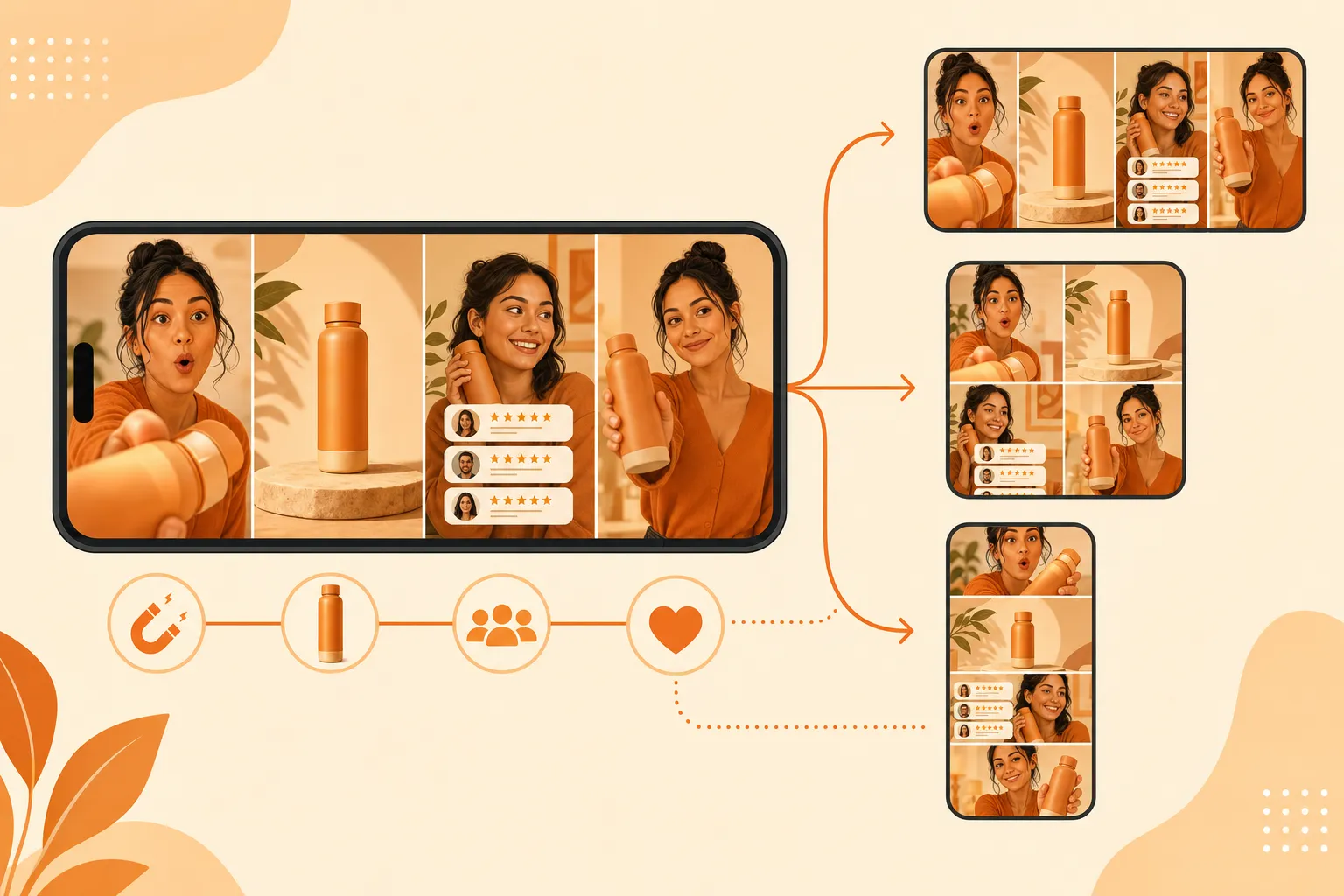
- Hook — 0–2s. Because Google may crop your video to square or vertical, the hook has to survive a center-crop. Put the speaker, the product, and the promise in the middle third of the frame. Text overlays near the edges will get cut.
- Product reveal — 2–10s. Show the product in motion against a clean background. For AI-generated assets, this is where product-page imagery becomes a hero visual — a demo, a texture close-up, a before/after. Avoid busy backgrounds; they compress badly in smaller placements.
- Proof — 10–20s. One social-proof beat: a star rating, a review quote, a customer count. In feed placements, stacked proof reads as clutter; pick the single strongest signal.
- CTA — last 5s. State the action verbally and visually. PMax overlays its own CTA buttons, so the verbal ask and the on-screen button should agree. Don't put a hard end-card with text in the bottom third — it collides with the overlay.
Because PMax serves the same asset as a skippable in-stream ad, a Shorts tile, and a Discover image-with-video unit, think of the asset as a system, not a spot: center-weighted composition, clear audio, on-screen captions for sound-off placements.
Per-niche hook patterns for PMax and Demand Gen
The same asset pipeline produces different winners per category. These are the patterns that consistently hold up across Google's inventory:

Skincare and beauty
Hook: problem-first ("Why your skin still looks tired by 3pm"). First frame should be the texture or the concern, not the bottle — the bottle comes at the reveal. This category over-indexes on sound-off placements, so burned-in captions are non-negotiable. Compliance is the hard ceiling: no medical claims, no "cures", no before/after that implies treatment. Google's health claims policy applies to every placement, and AI-generated creatives get the same review as human-shot ones.
Supplements and wellness
Hook: outcome-first ("30 days in, my afternoon crashes are gone"). PMax and Demand Gen shoppers in this category convert on identity and routine more than ingredient lists. Keep claims to "supports" / "may help with" / "many customers report" — treatment, prevention, and diagnosis claims get accounts flagged regardless of whether the video is AI-generated or human-shot.
Fashion and apparel
Hook: identity-first or transformation ("Here's what actually fits a 5'4 frame"). The reveal is the fit on a body, not the garment on a hanger. Movement sells in feed placements; a static product shot reads as an ad. AI pipelines with motion control — reference-to-video from the brand's lookbook — beat a static hero image every time, and the same asset can feed both PMax and Demand Gen.
Home and kitchen
Hook: transformation ("This 12-second install changed my kitchen"). First frame shows the result, not the packaging. Home content overperforms in Discover and Shorts because the placement skews toward lifestyle and DIY — lean into the before/after and the "renters can do this too" angle.
Asset-group strategy: where AI creative fits
The most common PMax setup mistake is one asset group per product with three images and no video. The structure that works:
| Strategy | Why it works |
|---|---|
| One asset group per theme (product category, audience, or margin tier) | Lets Google match the right assets to the right queries |
| 1 video per orientation per asset group (16:9 + 1:1 + 9:16) | Maximizes placement eligibility; Google recommends 1 of each |
| 3+ images per orientation alongside video | The "rule of three" gives the algorithm enough combinations to test |
| Swap in fresh video every 2–3 weeks | Google's auction rewards new creative; stale assets plateau |
| Keep the offer and landing page stable while testing creative | You isolate the variable — creative, not the offer |
For Demand Gen, the same asset discipline applies at the ad-group level, with one addition: because Demand Gen gives you more targeting control, you can split creative by audience (new customer creative vs repeat customer creative) without guessing — the format tells you which assets each segment responds to.
PMax vs Demand Gen: which campaign gets which video
| Decision | Performance Max | Demand Gen |
|---|---|---|
| Primary goal | Conversions across the full funnel | Consideration, discovery, and conversion from feeds |
| Inventory | Search, Shopping, Display, YouTube, Discover, Gmail, Maps | YouTube (Shorts, In-stream, Home, Search, Watch Next), Discover, Gmail, GDN, Video Partners |
| Creative control | Low — Google assembles and tests combinations | Medium — you control the creative per ad group |
| Targeting | Automated, goal-based | Custom segments, lookalikes, demographics, exclusions |
| Video role | Strong differentiator; optional because Google auto-generates | Strong differentiator; feeds are video-first |
| Learning period | Expect a learning period after launch or significant edits (third-party sources commonly cite 2–6 weeks; Google's own guidance is that duration depends on conversion volume) | Similar — budget stability shortens it |
A common winning structure: run a PMax campaign for capture and a Demand Gen campaign for discovery, and feed both from the same video asset library. The same 9:16 AI UGC creative that wins in Shorts placements can be uploaded to both campaign types — Google will crop and trim it to fit.
Cost math: AI pipeline vs UGC creator vs in-house
The budget question for a PMax video library (say, 12 assets — 3 hooks × 2 products × 2 orientations — refreshed monthly):
| Channel | Cost per creative | Turnaround | 12-asset library |
|---|---|---|---|
| UGC creator (mid-tier) | $400–$800 | 7–14 days | $4,800–$9,600 |
| In-house studio shoot | $1,500–$5,000 | 2–4 weeks | $18k–$60k |
| Agency-managed | $1,000–$2,500 | 4–6 weeks | $12k–$30k |
| AI pipeline (Prizmad) | ≈$7–13 per finished ad | under 10 min | ≈$85–156, same day |

The AI line is a conservative estimate based on current plan pricing (Launch $39/mo for 3,000 tokens, roughly 3 finished avatar ads; Starter $99/mo for 8,000 tokens; Pro $249/mo for 35,000 tokens, per Prizmad pricing). The cost difference moves the bottleneck from budget to script-writing — which is the right bottleneck, because script variety is what Google's auction actually rewards. An account that rotates 12 fresh video assets a month consistently out-tests an account that runs 3 for a quarter.
Compliance — the notes that trip up AI creatives
PMax and Demand Gen follow the same Google Ads policies as every other placement, plus the synthetic-content rules:
- AI disclosure. Google requires ads that contain synthetic or altered content — realistic people doing or saying things they didn't — to be labeled. Ad accounts need to self-identify in Google Ads, and YouTube's "altered or synthetic content" disclosure applies to uploads. Apply the label; the algorithm and the reviewer both check.
- Avatar likeness. Don't generate avatars that look like real identifiable people, competitors' founders, or your customers. This is a platform-policy issue and a right-of-publicity issue in the US and EU.
- Health and money claims. The policy does not change because the creative is AI-generated. Skincare and supplements are the two categories that get accounts flagged fastest.
- Misrepresentation. PMax auto-assembles ads from your assets — make sure every asset's claims match the landing page, because Google's misrepresentation policy applies to the assembled ad, not just the individual assets.
Frequently asked questions
What is Prizmad?
Prizmad is an AI ad agent for ecommerce brands. Paste a product link or describe your product in a chat, and the agent — trained on 60M+ ad creatives — writes the hooks and script, casts an AI actor and voice, and delivers ready-to-post video ads for TikTok, Reels and Shorts in about 5 minutes.
What are AI UGC ads?
AI UGC ads (AI-generated user-generated content ads) are video advertisements that use AI avatars, synthetic voiceovers, and automated editing to replicate the authentic, creator-style content traditionally filmed by real influencers or users. Prizmad generates AI UGC video ads from any product URL in minutes — at a fraction of the cost of hiring human UGC creators.
How long does it take to generate a video?
Most videos are ready within 5 minutes. Complex ads with custom avatars may take up to 10 minutes. You'll receive a notification when your video is ready.
Do I need video editing experience?
Not at all. You just chat: paste a product link, say what you want, and the agent handles the script, actor, voice and editing. Want a change? Ask in plain words.
Do I need a product link to get started?
No. A link is the fastest start — paste a page from Shopify, Amazon, Etsy or any store and the agent reads it. Or just describe your product in the chat.
Can I edit the AI-generated script?
Yes. The agent shows you the hooks and script before anything renders — edit any line yourself or ask it to ("make the hook punchier", "shorter CTA").
What platforms can I publish to?
Export videos ready for TikTok, Instagram Reels, Facebook Ads, YouTube Shorts, Shopify, and Amazon. All standard formats are included: 9:16 (vertical), 1:1 (square feed), and 16:9 (landscape) — all in Full HD 1080p.
How does AI UGC compare to hiring human UGC creators?
Traditional UGC creators charge $500–$2,000 per video and take 1–3 weeks to deliver. AI UGC ads from Prizmad cost approximately $7–13 per video (depending on your plan), generate in about 5 minutes, and can be produced in unlimited variations for A/B testing — in 15 languages from a single product link.
Do I own commercial rights to my AI-generated ads?
Yes. You own full commercial rights to every video ad you generate with Prizmad. Use them on any advertising platform, in any market, for as long as you want — no additional licensing fees.
Is it legal to run AI-generated video ads on TikTok, Meta, and Google?
Yes. AI-generated video ads are permitted on major ad platforms including Meta (Facebook and Instagram), TikTok, Google, and YouTube, provided they comply with each platform's advertising policies and any applicable AI-content disclosure requirements. You own full commercial rights to every video ad generated with Prizmad and can run them on any advertising platform without additional licensing fees.
How do tokens work?
Chatting with the agent is free — tokens are spent only on what it generates, like videos, images and voiceovers. A finished video ad with an AI avatar costs around 1,000 tokens; simpler videos cost far less. Launch includes 3,000 tokens, Starter 8,000 and Pro 35,000. Plan tokens refresh each billing cycle; top-up tokens never expire.
Can I cancel my subscription?
Yes, you can cancel anytime from your account settings. You'll keep access until the end of your billing period. No questions asked.
Ready to feed Google the video it wants? Paste your product URL into the Prizmad generator and get a 9:16, Square-ready mp4 in about five minutes — upload the same file to PMax and Demand Gen asset groups, and let the auction do the rest.